---
title: Self Ordering Kiosk for Restaurants & QSR | Kokipay
description: "Turn a Kokipay POS into a self-ordering kiosk: table-top, wall-mount or freestanding 21.5″ units with dietary tags, upsells and kitchen-direct orders."
---
Card surcharging ended on 1 October 2026. Keep more of every sale with Low Cost EFTPOS. [See Low Cost EFTPOS](https://kokipay.com/low-cost-eftpos?hsLang=en-au)
[](https://kokipay.com/?hsLang=en-au)
- [Payments](https://kokipay.com/low-cost-eftpos?hsLang=en-au)
[**Low Cost EFTPOS**Fast, secure terminals with no lock-in contract](https://kokipay.com/low-cost-eftpos?hsLang=en-au) [**Super Saver EFTPOS**Our lowest flat rate on domestic and international cards](https://kokipay.com/eftpos-saver?hsLang=en-au) [**Mobile Tap to Pay**Take card payments on your phone](https://kokipay.com/mobile-tap-to-pay?hsLang=en-au)
- [POS & Ordering](https://kokipay.com/pos-point-of-sale?hsLang=en-au)
[**Smart POS**$0 POS software with every advanced feature](https://kokipay.com/pos-point-of-sale?hsLang=en-au) [**Online Ordering**$0 branded ordering website, no setup fee](https://kokipay.com/online-ordering?hsLang=en-au) [**QR & Table Ordering**$0 scan, order and pay from the table](https://kokipay.com/qr-code-table-online-ordering-system?hsLang=en-au) [**Delivery**Your drivers or on-demand couriers](https://kokipay.com/delivery?hsLang=en-au) [**Kitchen Display**Every order on one kitchen screen](https://kokipay.com/kitchen-display?hsLang=en-au) [**Customer Display Screen**Order, total and promos facing the customer](https://kokipay.com/customer-display-screen?hsLang=en-au) [**Reservations**Online bookings tied to your floor plan](https://kokipay.com/reservations?hsLang=en-au) [**Multi Location**Run every venue from one account](https://kokipay.com/multi-location?hsLang=en-au) [**Self Ordering Kiosk**Cut the queue with self-service](https://kokipay.com/self-ordering-kiosk?hsLang=en-au) [**Uber Eats Integration**Delivery app orders straight into the POS](https://kokipay.com/uber-eats-integration?hsLang=en-au)
- [Grow](https://kokipay.com/loyalty-rewards?hsLang=en-au)
[**AI Google Reviews**More 5-star reviews, replies drafted by AI](https://kokipay.com/ai-google-reviews?hsLang=en-au) [**Loyalty & Rewards**Points, punch cards and VIP tiers](https://kokipay.com/loyalty-rewards?hsLang=en-au) [**Targeted Promotions**The right offer to the right customers](https://kokipay.com/targeted-promotions?hsLang=en-au) [**Marketing Campaigns**Email and SMS that bring people back](https://kokipay.com/marketing-campaigns?hsLang=en-au) [**Gift Cards**Sell and redeem at the register](https://kokipay.com/gift-cards?hsLang=en-au) [**Staff Shift Management**Clock-ins, tills and staff performance](https://kokipay.com/staff-shift-management?hsLang=en-au)
- [Industries](https://kokipay.com/eftpos-for-hospitality?hsLang=en-au)
[**Hospitality**Restaurants, cafes, bars and hotels](https://kokipay.com/eftpos-for-hospitality?hsLang=en-au) [**Retail**Counter and mobile EFTPOS for shops](https://kokipay.com/eftpos-for-retail?hsLang=en-au) [**Hair & Beauty**Pay at the counter or at the chair](https://kokipay.com/eftpos-for-hair-and-beauty-salons?hsLang=en-au) [**Trades**Get paid on site when the job is done](https://kokipay.com/eftpos-for-trades?hsLang=en-au)
- [Pricing](https://kokipay.com/pos-plans-price?hsLang=en-au)
- [Shop](https://shop.kokipay.com/)
[Sign up](https://kokipay.com/signup?hsLang=en-au) [Get started](https://kokipay.com/self-ordering-kiosk#page-form)
Menu
Payments
[Low Cost EFTPOS](https://kokipay.com/low-cost-eftpos?hsLang=en-au) [Super Saver EFTPOS](https://kokipay.com/eftpos-saver?hsLang=en-au) [Mobile Tap to Pay](https://kokipay.com/mobile-tap-to-pay?hsLang=en-au)
POS & Ordering
[Smart POS](https://kokipay.com/pos-point-of-sale?hsLang=en-au) [Online Ordering](https://kokipay.com/online-ordering?hsLang=en-au) [QR & Table Ordering](https://kokipay.com/qr-code-table-online-ordering-system?hsLang=en-au) [Delivery](https://kokipay.com/delivery?hsLang=en-au) [Kitchen Display](https://kokipay.com/kitchen-display?hsLang=en-au) [Customer Display Screen](https://kokipay.com/customer-display-screen?hsLang=en-au) [Reservations](https://kokipay.com/reservations?hsLang=en-au) [Multi Location](https://kokipay.com/multi-location?hsLang=en-au) [Self Ordering Kiosk](https://kokipay.com/self-ordering-kiosk?hsLang=en-au) [Uber Eats Integration](https://kokipay.com/uber-eats-integration?hsLang=en-au)
Grow
[AI Google Reviews](https://kokipay.com/ai-google-reviews?hsLang=en-au) [Loyalty & Rewards](https://kokipay.com/loyalty-rewards?hsLang=en-au) [Targeted Promotions](https://kokipay.com/targeted-promotions?hsLang=en-au) [Marketing Campaigns](https://kokipay.com/marketing-campaigns?hsLang=en-au) [Gift Cards](https://kokipay.com/gift-cards?hsLang=en-au) [Staff Shift Management](https://kokipay.com/staff-shift-management?hsLang=en-au)
Industries
[Hospitality](https://kokipay.com/eftpos-for-hospitality?hsLang=en-au) [Retail](https://kokipay.com/eftpos-for-retail?hsLang=en-au) [Hair & Beauty](https://kokipay.com/eftpos-for-hair-and-beauty-salons?hsLang=en-au) [Trades](https://kokipay.com/eftpos-for-trades?hsLang=en-au)
More
[Pricing](https://kokipay.com/pos-plans-price?hsLang=en-au) [Shop](https://shop.kokipay.com/)
[Get started](https://kokipay.com/self-ordering-kiosk#page-form)
1. [Home](https://kokipay.com/?hsLang=en-au)
2. [POS & Ordering](https://kokipay.com/pos-point-of-sale?hsLang=en-au)
3. Self Ordering Kiosk
Self-service
# A *Self Ordering Kiosk* that cuts the queue
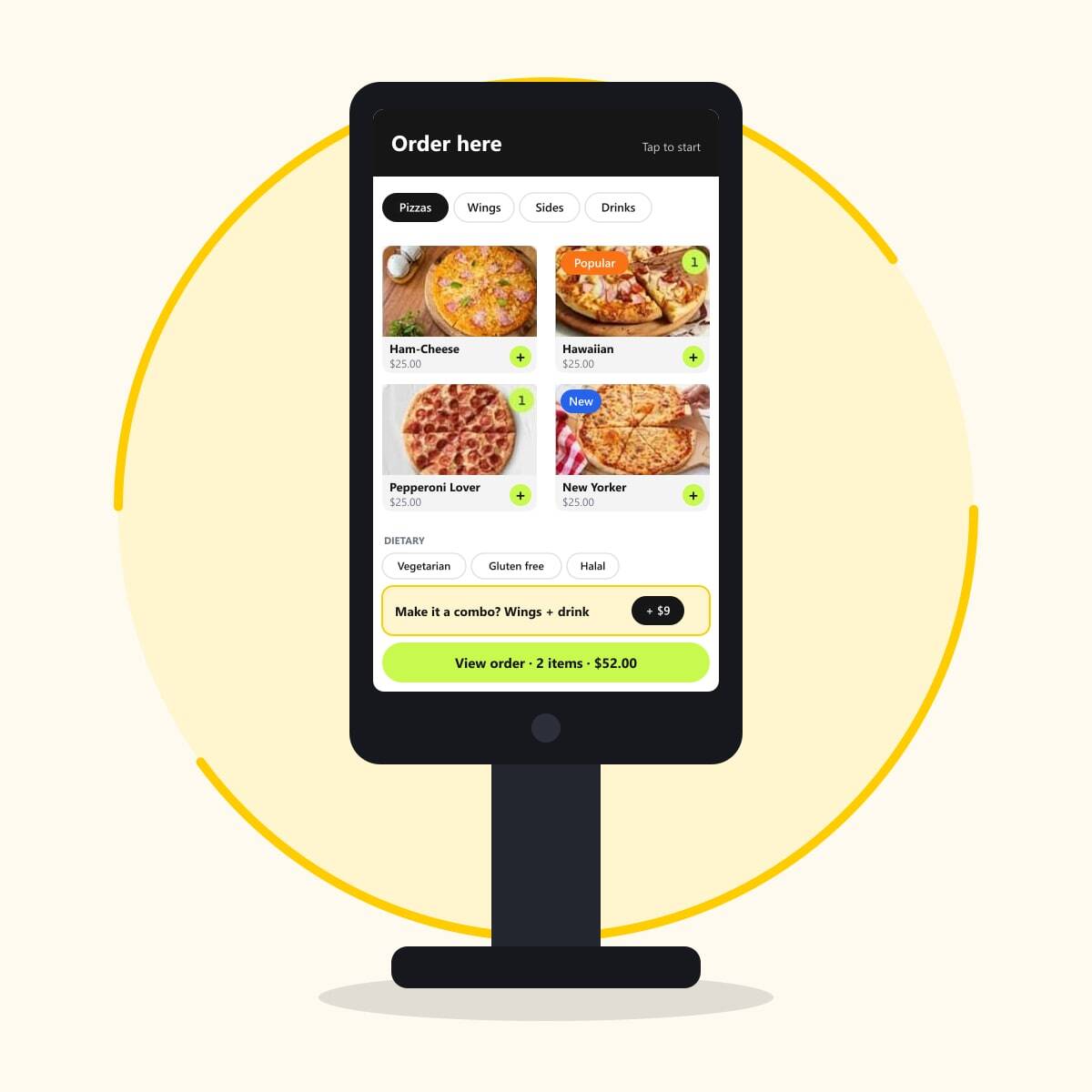
Let customers browse, customise and pay for themselves. Kokipay POS can run in kiosk mode, so the kiosk shares your menu, prices and kitchen routing.
[Get Started](https://kokipay.com/self-ordering-kiosk#page-form) [Sign up for $0 Smart POS](https://payments.kokipay.com/subscribe/670d03b8ef1fe6e185beb662/no-cost-smart-pos-online-ordering)
Kiosk mode on Kokipay POS21.5″ table, wall or freestandingUpsells built in
In short
## How does a self-ordering kiosk work?
A self-ordering kiosk is a touchscreen where customers place and pay for their own order. With Kokipay, the POS itself runs in kiosk mode, so the kiosk uses the same menu, photos, modifiers and prices, sends orders straight to the kitchen display or printer, and prompts upsells on every order without adding staff.
### Key facts
- POS can work as a kiosk
- 21.5″ table-seat, wall-mount or freestanding units
- Dietary and sales tags
- Upsell and cross-sell prompts
- Orders route to kitchen screens and printers
Shorter queues, bigger baskets
## Why venues add a kiosk
### Cut the queue
Customers order at their own pace while staff focus on making and serving.
### Upsell every order
Upsell and cross-sell prompts appear every time, with no awkward ask.
### Dietary & sales tags
Tag items as vegetarian, gluten free, new or popular so customers choose with confidence.
### One menu everywhere
The kiosk uses the same menu, photos and modifiers as your POS and online store.
### Straight to the kitchen
Kiosk orders route to kitchen displays and printers like any other order.
### Flexible mounting
21.5″ units for table seat, wall mount or freestanding placement.
Works with
## One system, not a stack of apps
Every Kokipay module shares the same menu, customers, orders and reports.
### [Kitchen Display Every order on one kitchen screen. Explore →](https://kokipay.com/kitchen-display?hsLang=en-au)
### [QR & Table Ordering Guests order and pay from the table. Explore →](https://kokipay.com/qr-code-table-online-ordering-system?hsLang=en-au)
### [Smart POS The $0 register every module plugs into. Explore →](https://kokipay.com/pos-point-of-sale?hsLang=en-au)
FAQ
## Self Ordering Kiosk FAQs
### Do I need separate kiosk software?
No. Kokipay POS can work as a kiosk, so it shares your existing menu, prices and kitchen routing.
### What kiosk hardware is available?
21.5″ units for table seat, wall mount or freestanding placement. Talk to us about what suits your venue.
### Can the kiosk upsell?
Yes. Upsell and cross-sell prompts are built in, along with dietary and sales tags on menu items.
### Is QR ordering an alternative?
Yes. [QR & table ordering](https://kokipay.com/qr-code-table-online-ordering-system?hsLang=en-au) gives customers the same self-service on their own phone, with no hardware.
Talk to us
## Curious? We welcome you to find out!
Reach out to us, and we'll give you all the information you need to make an informed decision. We're confident you'll be impressed with our service.
[Get Started](https://kokipay.com/self-ordering-kiosk#page-form)
Get in Touch
## Say goodbye to costly EFTPOS and outdated POS
Leave your details and our team will be in touch.
- Local Australian team on standby
- No lock-in contracts
- $0 Advanced Smart POS software
- $0 Online and QR ordering
[](https://kokipay.com/?hsLang=en-au)
Payments made simple: low cost EFTPOS, free POS software and free online ordering for Australian businesses.
Sydney / Melbourne / Adelaide / Perth / Brisbane / Cairns / Darwin / Hobart
Smart POS app: [App Store](https://apps.apple.com/us/app/kokipos/id6792234992) [Google Play](https://play.google.com/store/apps/details?id=com.hospitalityos.pos)
### Payments
- [Low Cost EFTPOS](https://kokipay.com/low-cost-eftpos?hsLang=en-au)
- [Super Saver EFTPOS](https://kokipay.com/eftpos-saver?hsLang=en-au)
- [Mobile Tap to Pay](https://kokipay.com/mobile-tap-to-pay?hsLang=en-au)
- [K156 Smart POS + EFTPOS](https://kokipay.com/smart-pos-k156-full-hd?hsLang=en-au)
- [K156D Dual-Screen + EFTPOS](https://kokipay.com/smart-pos-k156-dual-screen?hsLang=en-au)
- [Shop](https://shop.kokipay.com/)
### POS & Ordering
- [Smart POS](https://kokipay.com/pos-point-of-sale?hsLang=en-au)
- [Online Ordering](https://kokipay.com/online-ordering?hsLang=en-au)
- [QR & Table Ordering](https://kokipay.com/qr-code-table-online-ordering-system?hsLang=en-au)
- [Delivery](https://kokipay.com/delivery?hsLang=en-au)
- [Kitchen Display](https://kokipay.com/kitchen-display?hsLang=en-au)
- [Customer Display Screen](https://kokipay.com/customer-display-screen?hsLang=en-au)
- [Reservations](https://kokipay.com/reservations?hsLang=en-au)
- [Multi Location](https://kokipay.com/multi-location?hsLang=en-au)
- [Self Ordering Kiosk](https://kokipay.com/self-ordering-kiosk?hsLang=en-au)
- [Uber Eats Integration](https://kokipay.com/uber-eats-integration?hsLang=en-au)
- [Pricing](https://kokipay.com/pos-plans-price?hsLang=en-au)
### Grow
- [AI Google Reviews](https://kokipay.com/ai-google-reviews?hsLang=en-au)
- [Loyalty & Rewards](https://kokipay.com/loyalty-rewards?hsLang=en-au)
- [Targeted Promotions](https://kokipay.com/targeted-promotions?hsLang=en-au)
- [Marketing Campaigns](https://kokipay.com/marketing-campaigns?hsLang=en-au)
- [Gift Cards](https://kokipay.com/gift-cards?hsLang=en-au)
- [Staff Shift Management](https://kokipay.com/staff-shift-management?hsLang=en-au)
### Industries
- [Hospitality](https://kokipay.com/eftpos-for-hospitality?hsLang=en-au)
- [Retail](https://kokipay.com/eftpos-for-retail?hsLang=en-au)
- [Hair & Beauty](https://kokipay.com/eftpos-for-hair-and-beauty-salons?hsLang=en-au)
- [Trades](https://kokipay.com/eftpos-for-trades?hsLang=en-au)
### Legal
- [Privacy Policy](https://kokipay.com/privacy-policy?hsLang=en-au)
- [Terms and Conditions](https://kokipay.com/terms-and-conditions?hsLang=en-au)
- [Licence Agreement](https://kokipay.com/end-user-licence-agreement?hsLang=en-au)
- [Delivery Policy](https://kokipay.com/delivery-policy?hsLang=en-au)
- [Warranty & Replacement](https://kokipay.com/warranty-policy?hsLang=en-au)
- [Return & Refund](https://kokipay.com/return-n-refund?hsLang=en-au)
© 2026 Kokipay. All rights reserved. ABN 20 669 515 940
```json
{
"@context" : "https://schema.org",
"@id" : "https://kokipay.com/#organization",
"@type" : "Organization",
"areaServed" : {
"@type" : "Country",
"name" : "Australia"
},
"description" : "Kokipay provides low cost EFTPOS, free Smart POS software, QR code table ordering, online ordering and mobile Tap to Pay for Australian businesses.",
"logo" : "https://kokipay.com/hubfs/Kokipay%20logo%20yellow%20.png",
"name" : "Kokipay",
"sameAs" : [ "https://www.facebook.com/kokipay/", "https://www.instagram.com/kokipayau/", "https://www.youtube.com/@Kokipay-q6x" ],
"taxID" : "ABN 20 669 515 940",
"url" : "https://kokipay.com/"
}
```
```json
{
"@context" : "https://schema.org",
"@id" : "https://kokipay.com/#website",
"@type" : "WebSite",
"inLanguage" : "en-AU",
"name" : "Kokipay",
"publisher" : {
"@id" : "https://kokipay.com/#organization"
},
"url" : "https://kokipay.com/"
}
```
```json
{
"@context" : "https://schema.org",
"@id" : "https://kokipay.com/self-ordering-kiosk#webpage",
"@type" : "WebPage",
"about" : {
"@id" : "https://kokipay.com/#organization"
},
"description" : "Turn a Kokipay POS into a self-ordering kiosk: table-top, wall-mount or freestanding 21.5″ units with dietary tags, upsells and kitchen-direct orders.",
"inLanguage" : "en-AU",
"isPartOf" : {
"@id" : "https://kokipay.com/#website"
},
"name" : "Self Ordering Kiosk for Restaurants & QSR | Kokipay",
"url" : "https://kokipay.com/self-ordering-kiosk"
}
```
```json
{
"@context" : "https://schema.org",
"@id" : "https://kokipay.com/self-ordering-kiosk#breadcrumb",
"@type" : "BreadcrumbList",
"itemListElement" : [ {
"@type" : "ListItem",
"item" : "https://kokipay.com/",
"name" : "Home",
"position" : 1
}, {
"@type" : "ListItem",
"item" : "https://kokipay.com/pos-point-of-sale",
"name" : "POS & Ordering",
"position" : 2
}, {
"@type" : "ListItem",
"item" : "https://kokipay.com/self-ordering-kiosk",
"name" : "Self Ordering Kiosk",
"position" : 3
} ]
}
```
```json
{
"@context" : "https://schema.org",
"@id" : "https://kokipay.com/self-ordering-kiosk#service",
"@type" : "Service",
"areaServed" : {
"@type" : "Country",
"name" : "Australia"
},
"description" : "Turn a Kokipay POS into a self-ordering kiosk: table-top, wall-mount or freestanding 21.5″ units with dietary tags, upsells and kitchen-direct orders.",
"name" : "Kokipay Self Ordering Kiosk",
"provider" : {
"@id" : "https://kokipay.com/#organization"
},
"serviceType" : "Self-ordering kiosk software",
"url" : "https://kokipay.com/self-ordering-kiosk"
}
```
```json
{
"@context" : "https://schema.org",
"@type" : "FAQPage",
"mainEntity" : [ {
"@type" : "Question",
"acceptedAnswer" : {
"@type" : "Answer",
"text" : "No. Kokipay POS can work as a kiosk, so it shares your existing menu, prices and kitchen routing."
},
"name" : "Do I need separate kiosk software?"
}, {
"@type" : "Question",
"acceptedAnswer" : {
"@type" : "Answer",
"text" : "21.5″ units for table seat, wall mount or freestanding placement. Talk to us about what suits your venue."
},
"name" : "What kiosk hardware is available?"
}, {
"@type" : "Question",
"acceptedAnswer" : {
"@type" : "Answer",
"text" : "Yes. Upsell and cross-sell prompts are built in, along with dietary and sales tags on menu items."
},
"name" : "Can the kiosk upsell?"
}, {
"@type" : "Question",
"acceptedAnswer" : {
"@type" : "Answer",
"text" : "Yes. QR & table ordering gives customers the same self-service on their own phone, with no hardware."
},
"name" : "Is QR ordering an alternative?"
} ]
}
```